Кот на машине - html + css
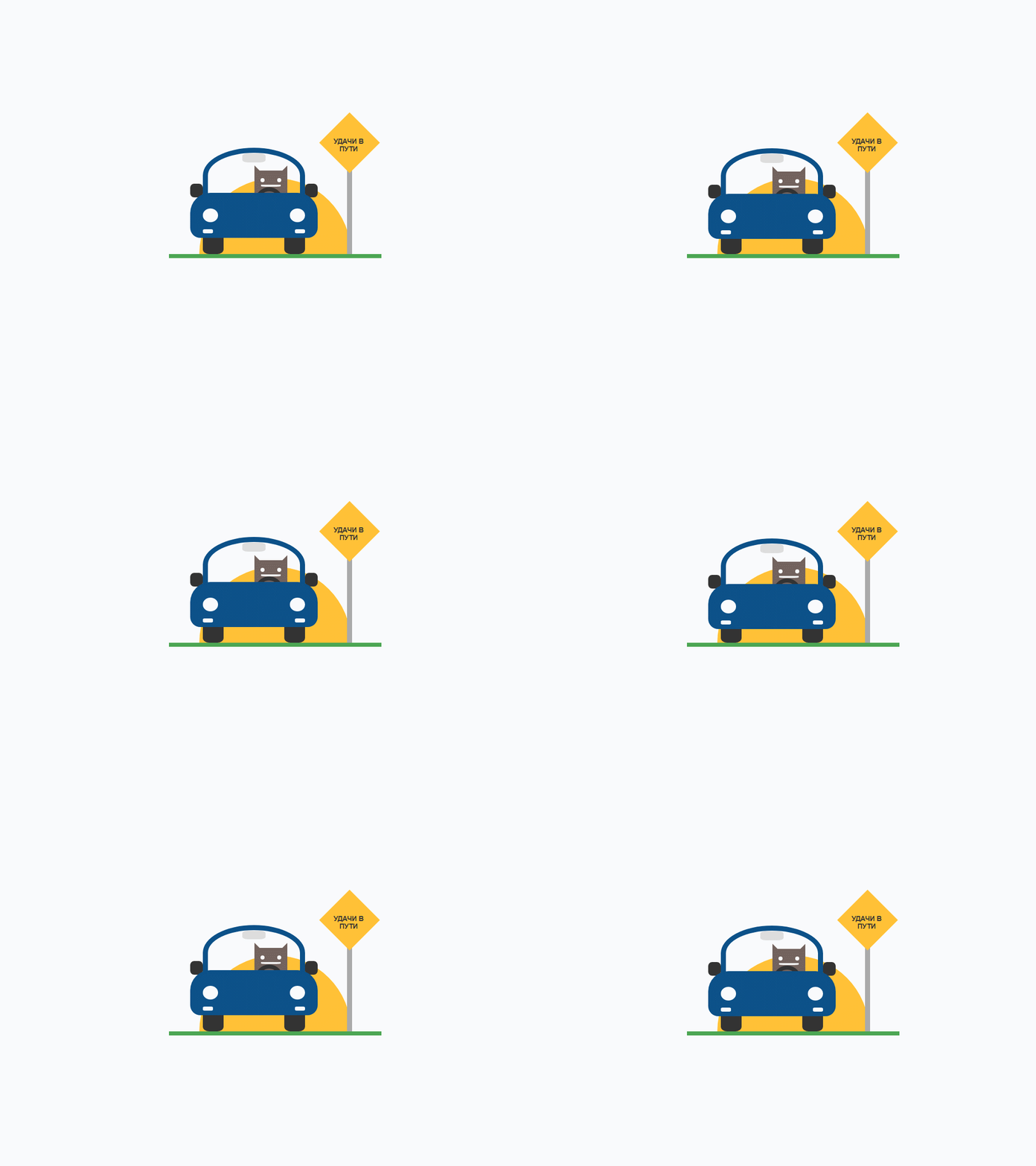
Кот едет на машине плавно амортизируя, создаётся впечатление реального движения. Оригинальный html + css элемент дизайна для вашего сайта или блога, который понравится вашим посетителям.
Установка кота на машине
Для установки добавьте css код в таблицу стилей, а html код там, где будет находиться котик. Блок кода серьёзно позиционирован, вы можете дополнительно позиционировать его, обернув в свой родительский элемент.
Код CSS для установки
.cat-car{
 position: relative;
 height: 350px;
 width: 420px;
 max-width: 100%;
 border-bottom: 8px solid #4CA653;
 overflow: hidden;
}
.cat-car div{
 display: block; position: absolute;
 margin: auto; padding: 0;
 top: 0; bottom: 0; left: 0; right: 0;
}
.cat-car span{ font-family: 'Impact', sans-serif; text-align: center; }

.cat-car .yellow{ background: #FFC137; }
.cat-car .left { right: auto; left: 0; }
.cat-car .right{ left: auto; right: 0; }

.cat-car .car{
 height: 60%; width: 60%;
 overflow: hidden;
 top: auto; right: auto; left: 10%;
 z-index: 1;
}
.cat-car .car .car-body{
 height: 85%; width: 100%;
 bottom: auto; z-index: 2;
 animation: cat-car-bounce .75s infinite;
 -webkit-animation: cat-car-bounce .75s infinite;
}
.cat-car .car .wheels{ height: 15%; width: 80%; top: auto; z-index: 1; }
.cat-car .car .wheels .wheel{
 height: 100%; width: 20%;
 background: #333; top: auto;
 border-radius: 0 0 30% 30%;
}
.cat-car .car .mirrors{ height: 15%; width: 100%; bottom: auto; top: 40%; }
.cat-car .car .mirrors .mirror{
 height: 100%; width: 10%;
 background: #333; top: auto;
 border-radius: 30%;
}
.cat-car .car-body .part-one{
 height: 50%; width: 72%;
 bottom: auto;
 border: 10px solid #0C5189;
 border-radius: 50% 50% 0 0;
 overflow: hidden;
}
.cat-car .car-body .part-two{
 height: 50%; width: 100%;
 top: auto;
 background: #0C5189;
 border-radius: 40px 40px 20px 20px;
}
.cat-car .car-body .part-one .drivmirror{
 height: 20%; width: 25%;
 bottom: auto; top: 1px;
 background: #DDD;
 border-radius: 25%;
}
.cat-car .car-body .part-one .helm{
 height: 40px; width: 40px;
 top: auto; bottom: -35px;
 border: 8px solid #333;
 border-radius: 50%;
 left: auto; right: 18%;
}
.cat-car .cat{
 background: #73635D;
 height: 60%; top: auto; bottom: 0;
 width: 65px; z-index: 0;
 left: auto; right: 25px;
}
.cat-car .cat::before,
.cat-car .cat::after{
 width: 0; height: 0;
 top: -10px; position: absolute; content: "";
}
.cat-car .cat::before{
 border-left: 0 solid transparent;
 border-right: 15px solid transparent;
 border-bottom: 15px solid #73635D;
 left: 0;
}
.cat-car .cat::after{
 border-right: 0 solid transparent;
 border-left: 15px solid transparent;
 border-bottom: 15px solid #73635D;
 right: 0;
}
.cat-car .cat .eyes{
 position: absolute;
 height: 8px; width: 8px;
 background: #FFF;
 border-radius: 100%;
 top: 15px;
}
.cat-car .cat .eyes.left { left: 12px; }
.cat-car .cat .eyes.right{ right: 12px; }
.cat-car .cat .mouth{
 position: absolute;
 height: 4px; width: 60%;
 background: #eee;
 border-radius: 0 0 30% 30%;
 top: 28px; margin: auto; left: 0; right: 0;
}
.cat-car .car:hover .cat .mouth{
 height: 6px; width: 6px;
 border-radius: 50%;
 top: 26px;
}
.cat-car .car-body .part-two .lights{ height: 30%; width: 80%; }
.cat-car .part-two .lights .light{
 height: 100%; width: 15%;
 background: #FFF;
 border-radius: 50%;
}
.cat-car .part-two .lights.second{
 height: 8px; width: 80%;
 top: auto; bottom: 10%;
}
.cat-car .part-two .lights.second .light{
 width: 20px; border-radius: 25%;
}
.cat-car .sign{
 height: 80%; width: 30%;
 left: auto; top: auto;
 z-index: 2;
}
.cat-car .sign .message{
 width: 0; height: 0;
 border: 60px solid transparent;
 border-bottom-color: #FFC137;
 position: relative;
 top: -60px; bottom: auto;
 z-index: 2;
}
.cat-car .sign .message::after{
 content: '';
 position: absolute;
 left: -60px; top: 60px;
 width: 0; height: 0;
 border: 60px solid transparent;
 border-top-color: #FFC137;
}
.cat-car .sign .message span{
 display: block; width: 60px;
 position: absolute; z-index: 9;
 text-align: center;
 left: -32px; top: 50px;
 color: #333;
 font-size: .85em;
 font-weight: bolder;
 font-family: Helvetica, Arial, sans-serif;
 text-transform: uppercase;
}
.cat-car .sign .base{ background: #AAA; height: 80%; width: 10px; top: auto; }
.cat-car .sun{
 height: 300px; width: 300px;
 top: auto; bottom: -150px;
 border-radius: 50%;
 z-index: 0;
}

@keyframes cat-car-bounce{
 0% { top: 0; }
 25% { top: 2px; }
 50% { top: 0; }
 75% { top: 5px; }
 100% { top: 0; }
}
@-webkit-keyframes cat-car-bounce{
 0% { top: 0; }
 25% { top: 2px; }
 50% { top: 0; }
 75% { top: 5px; }
 100% { top: 0; }
}
Код HTML для установки
<div class="cat-car">
 <div class="car">
 <div class="car-body">
 <div class="part-one">
 <div class="drivmirror"></div>
 <div class="cat">
 <span class="eyes left"></span>
 <span class="eyes right"></span>
 <span class="mouth"></span>
 </div>
 <div class="helm"></div>
 </div>
 <div class="mirrors">
 <div class="mirror left"></div>
 <div class="mirror right"></div>
 </div>
 <div class="part-two">
 <div class="lights">
 <div class="light left"></div>
 <div class="light right"></div>
 </div>
 <div class="lights second">
 <div class="light left"></div>
 <div class="light right"></div>
 </div>
 </div>
 </div>
 <div class="wheels">
 <div class="wheel left"></div>
 <div class="wheel right"></div>
 </div>
 </div>
 <div class="sign">
 <div class="message"><span>УДАЧИ В ПУТИ</span></div>
 <div class="base"></div>
 </div>
 <div class="sun yellow"></div>
</div>
Демо пример работы кода кота
Для просмотра примера, нажмите здесь

BootCat
- 🐱Категория:Кошки html
- 🐱Версия:1.0.0
- 🐱Рекомендовано: Для любого возраста
- 🐱Прикрепление: Смотреть
- 🐱Скачать: Файл
- 🐱Размер файла: 2.8 Kb
- 🐱Скачали: 7 раз
- 🐱Просмотров: 58
- 🐱Рейтинг: 5.0 из 1 голосов
- 🐱Добавлено: 14-08-2026 в 14:25:03
- 🐱Теги:
Похожие темы
Комментарии
| Всего комментариев: 0 | |